Anniversary Manager1.0
Publisher Description
★ Anniversary + D-day Manager (9 Types)★
No matter how much you make up your mind, you always miss the D-day, and why are there so many anniversaries after all? And how many days has it been; what is today, when is the 100th day, when is the 1000th day…Take care of all of them at one shot with the Anniversary Manager.
◎ How to Use
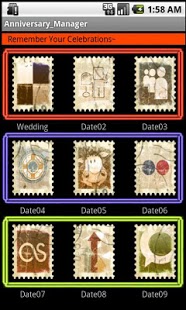
1. Initially, there are 9 stamp-shaped buttons.
Each button has a title below, where you can register your own anniversaries.
2. Press the corresponding button to input and save the title, which will be immediately reflected on the title of the initial screen.
3-1. Enter the anniversary with the Setup button to show how many days have passed from the set date ? 50th, 100th, 150th, 200th, 300th, 500th, 1000th, 2000th and such are immediately calculated and shown in full date format.
3-2. In case the registered date is still upcoming, it automatically recognizes it as a D-day instead of an anniversary, and displays how many days are left until that day.
4. You can register up to 9 dates, and after the registration, you can view all information just by clicking each button.
★ Required Specifications for Installation
Android 2.1 or higher
About Anniversary Manager
The company that develops Anniversary Manager is KH Software. The latest version released by its developer is 1.0. This app was rated by 1 users of our site and has an average rating of 3.0.
To install Anniversary Manager on your Android device, just click the green Continue To App button above to start the installation process. The app is listed on our website since 2011-11-29 and was downloaded 11 times. We have already checked if the download link is safe, however for your own protection we recommend that you scan the downloaded app with your antivirus. Your antivirus may detect the Anniversary Manager as malware as malware if the download link to anniversary_manager_free.rkh is broken.
How to install Anniversary Manager on your Android device:
- Click on the Continue To App button on our website. This will redirect you to Google Play.
- Once the Anniversary Manager is shown in the Google Play listing of your Android device, you can start its download and installation. Tap on the Install button located below the search bar and to the right of the app icon.
- A pop-up window with the permissions required by Anniversary Manager will be shown. Click on Accept to continue the process.
- Anniversary Manager will be downloaded onto your device, displaying a progress. Once the download completes, the installation will start and you'll get a notification after the installation is finished.
Program Details
System requirements
Download information
Pricing
Version History
version 1.0
posted on 2011-11-29
version 1.0
posted on 2011-11-29
Several fixes and updates
